Run your jobs. Know your numbers.
Quotes, jobs, costs, payments and profit in one simple system built for UK trades. See which quotes to chase, which jobs made money and who still owes you.
Founding price £59 for our first 10 customers, then £99.£99. One-time purchase, no subscription. Download straight away.
You're busy. But are you
actually making money?
Quotes go out and nobody chases them
You priced the job, sent it, and meant to follow up. Weeks later you're not sure who said no and who just forgot.
Jobs live in WhatsApp, texts and your head
Details are spread across messages, emails, notebooks and a spreadsheet you haven't opened in a month.
Pricing is a best guess
You know your day rate, but not whether the quote covers materials, a subbie and still leaves you something worth having.
Did that job actually make money?
It overran by two days and you had to go back for parts. Nobody added it up, so you'll price the next one the same way.
Money owed slips through
Deposits, stage payments, final invoices. Some are paid, some are late, and chasing them is the job you put off.
No clear picture of the business
Ask how this month is going and the honest answer is "busy". Busy isn't the same as profitable.
One simple system for the whole job.
A professionally built Excel workbook. Enter each job once. The quote, the follow-up, the costs, the invoices and the profit all follow from that one record, so you never type the same thing twice.
The questions you should be able to
answer in 30 seconds.
What should I charge?
Enter hours and costs and get a suggested price, with a warning if it's below your target.
Which quotes need chasing?
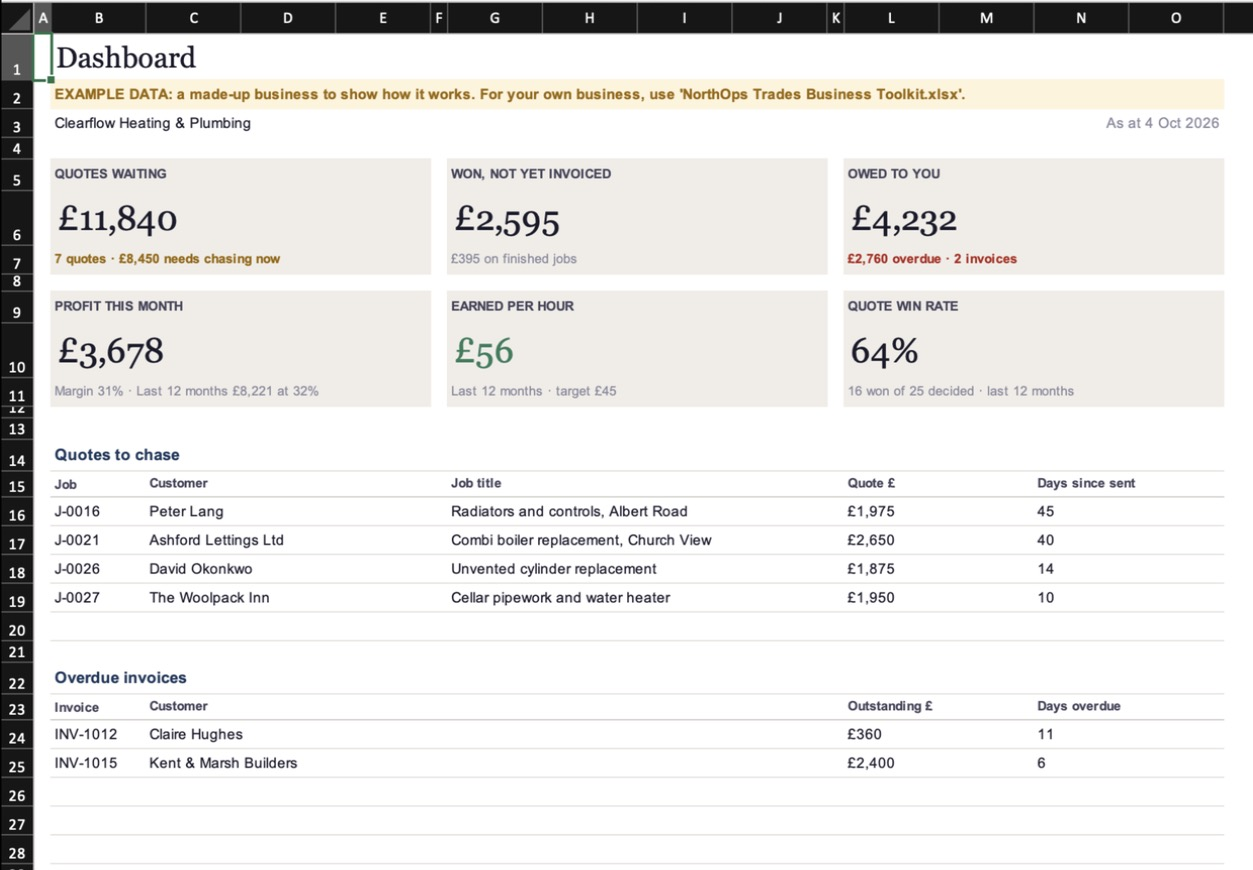
Every quote gets a chase date. The dashboard shows what's waiting and how much it's worth.
What work have I won?
Won jobs, jobs on the go and jobs finished, all in one register from first enquiry onwards.
Did that job make money?
Record what it actually cost and see the real profit and margin next to what you quoted.
What did I earn per hour?
What each hour on site actually brought in after materials and subcontractors.
Who owes me money?
Deposit, stage and final invoices tracked against each job, from sent to paid.
What's overdue?
Late invoices are flagged with how many days overdue, oldest first, so you know who to call.
How's the business doing?
Profit this month, win rate and earned per hour on one dashboard you can read in 30 seconds.
What did that job really pay you per hour?
Your rate says £55 an hour. But once the job overruns and you've paid for materials, the real figure can be a lot lower. The toolkit works it out for every finished job, so you can price the next one properly.
Illustrative example. Not a customer result.
From enquiry to paid, in one place.
Set up in about five minutes
Add your business details, VAT status, hourly rate, markups and the profit you're aiming for. Sensible defaults are already filled in.
Price the job and send the quote
Enter estimated hours, materials, subcontractors and other costs. Check the suggested price, write the scope, then save a professional quote with your name and logo as a PDF.
Chase it and win it
Every quote gets a chase date. When it's due, it shows up on your dashboard. Won? Change the status. The same record carries on.
Record what it actually cost
When the job's done, add your real hours and costs. Profit, margin and earned per hour appear straight away.
Invoice and get paid
Raise deposit, stage and final invoices against the job. VAT, totals and due dates are worked out, and overdue invoices are flagged.
Check the dashboard once a week
Ten minutes: chase the quotes it lists, call about the overdue invoices, and look at which jobs paid and which didn't.
Clean, calm and easy to follow.
Built so you can see what matters without being an Excel expert. Shaded cells work themselves out; you only fill in the white ones.
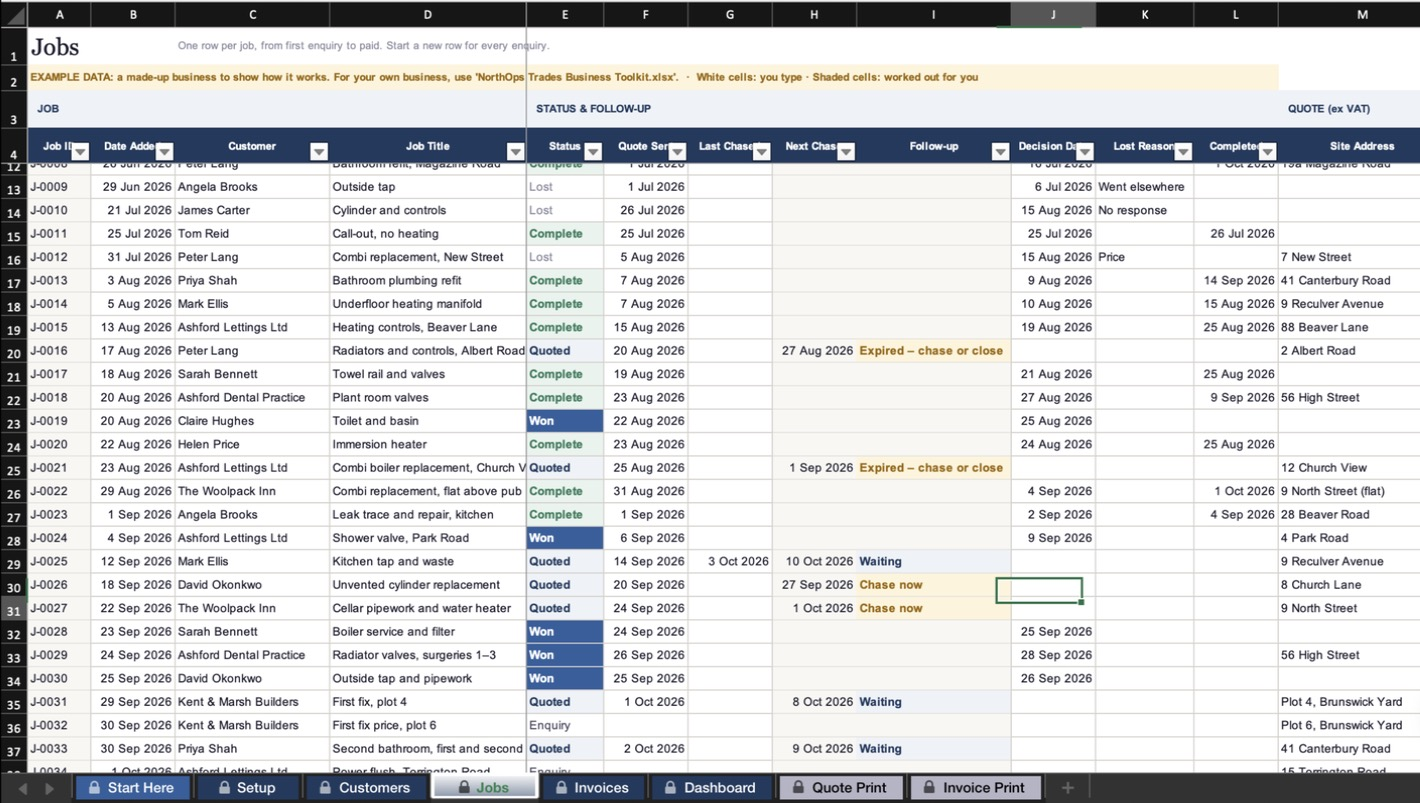
Jobs. One row per job, from enquiry to profit.
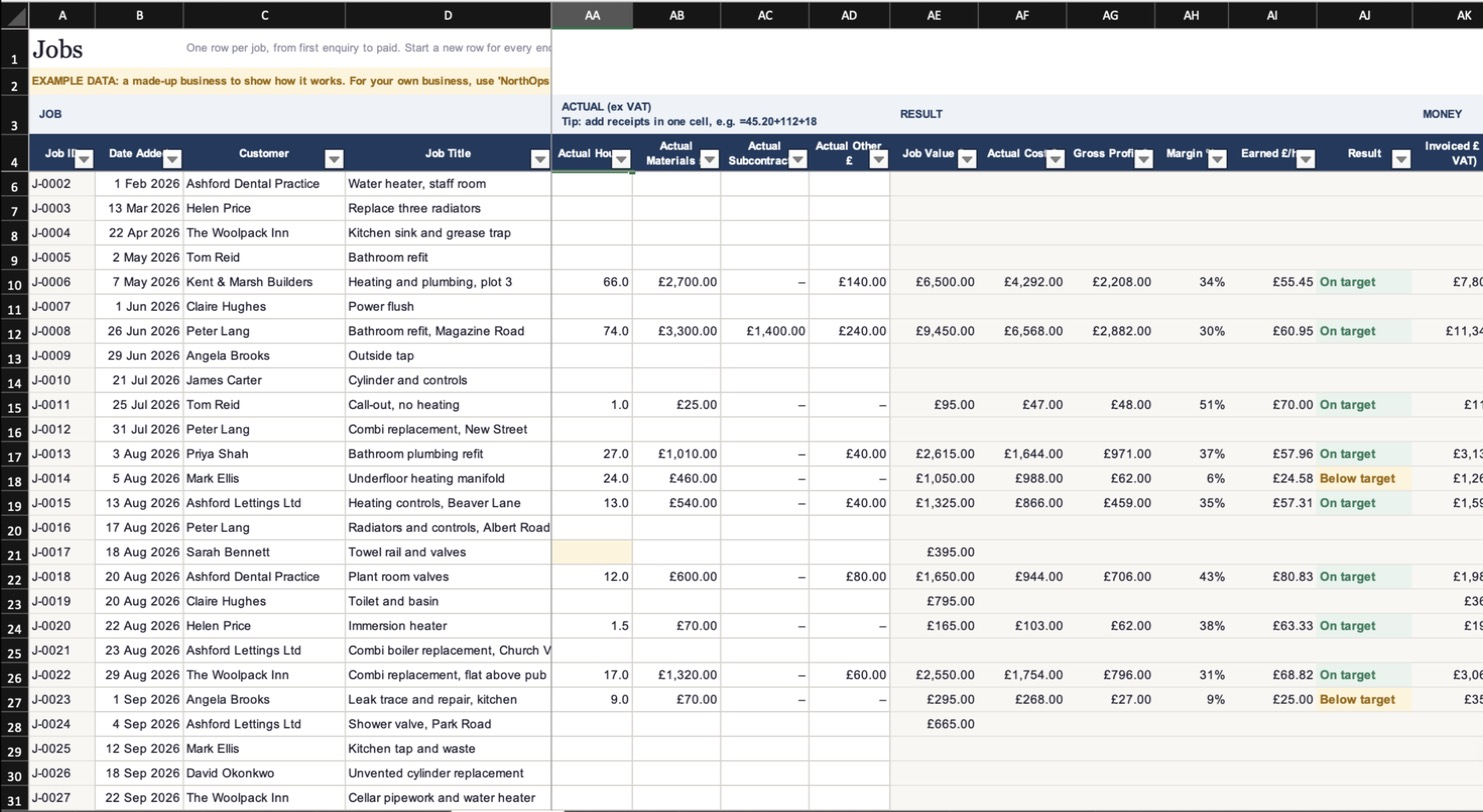
Job profit. Quoted against actual, side by side.
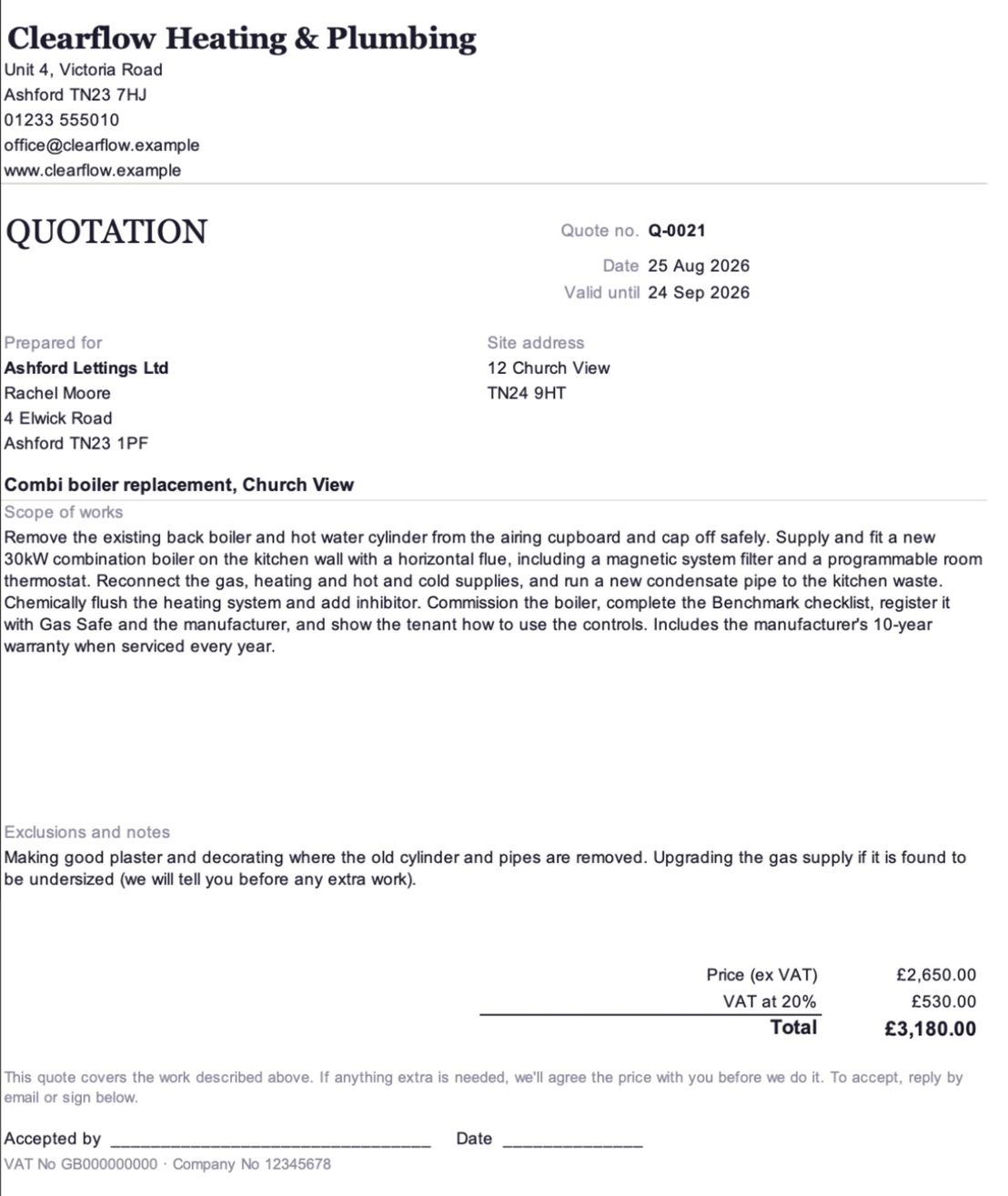
Quotes. Your name and logo, not ours.
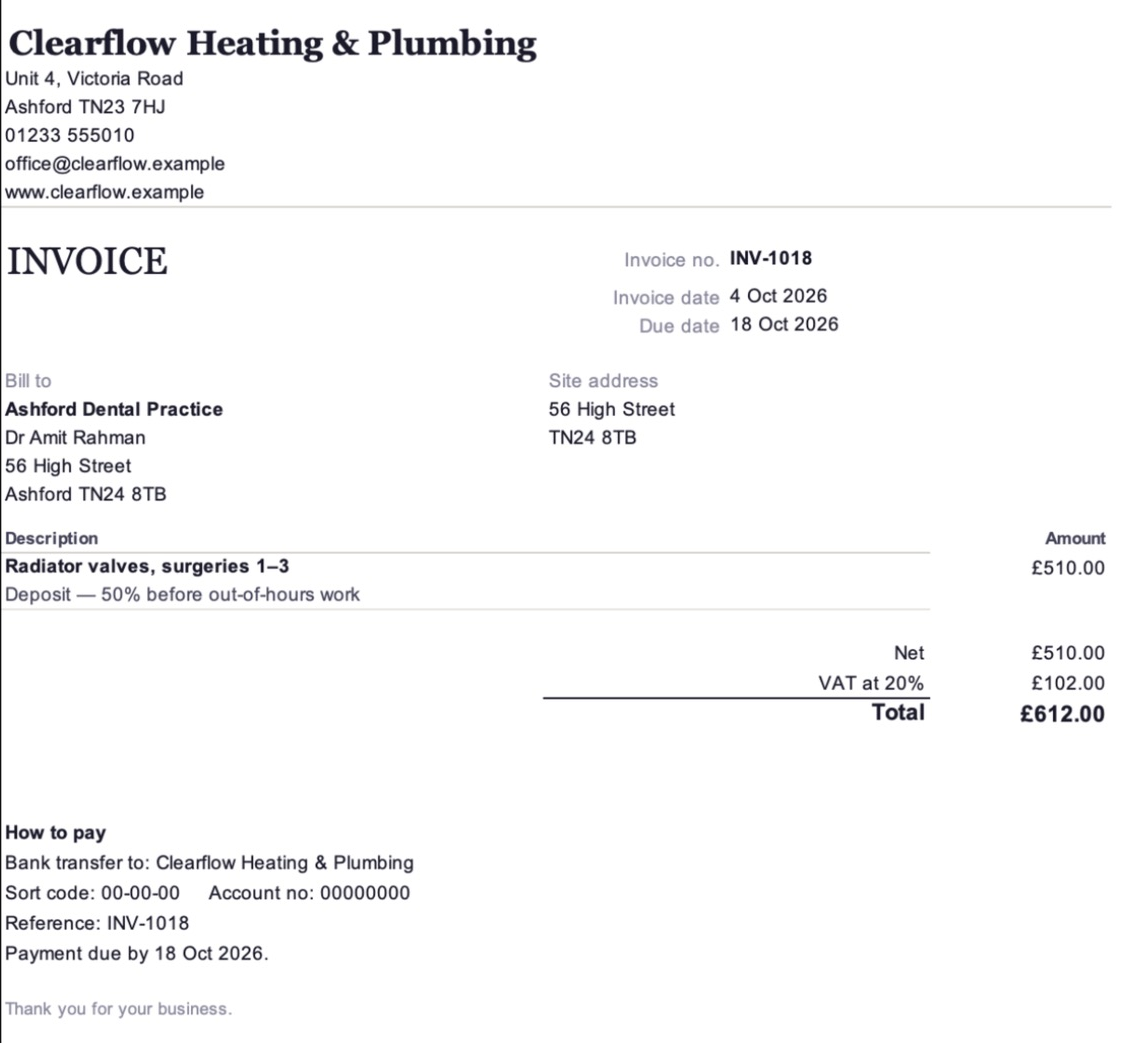
Invoices. Deposit, stage or final, with your bank details.
Built for owner-run trade businesses,
usually 1 to 5 people.
A good fit if you…
- Quote jobs and want to stop losing track of them
- Want to know if each job made money, not just whether you were busy
- Take deposits or stage payments and need to see what's owed
- Use Excel already, or are happy to
- Don't want another monthly subscription
Probably not for you if you need…
- Diaries, engineer scheduling or staff timesheets
- Bookkeeping, bank feeds, or Xero/QuickBooks links
- CIS deductions or VAT reverse-charge invoices
- To run it from your phone or in Google Sheets
- A system for a team of more than about five
Everything you need to start today.
The Toolkit workbook
Your clean, ready-to-use system: Start Here, Setup, Customers, Jobs, Invoices, Dashboard, plus printable Quote and Invoice pages.
An example workbook
The same system filled with a sample heating and plumbing business, so you can see how it all works before adding your own jobs.
Quick Start Guide
A short PDF that gets you from download to your first quote, with a simple weekly routine to keep on top of things.
Pay once. Use it for as long as it suits you.
One-time purchase · no subscription · instant download
- Toolkit workbook (.xlsx)
- Example workbook with a sample business
- Quick Start Guide (PDF)
- Fixes to Version 1 sent free
- Set it up yourself in about five minutes
£59 is our founding price for the first 10 customers, as thanks for buying early. After that the price is £99. No deadline, no countdown: it simply ends after the tenth sale.
Instant download: at checkout you tick a box to confirm you want the files straight away and that this ends your 14-day right to cancel. If a file is faulty, we'll repair it, replace it or refund you.
One-time payment · toolkit included
- Everything in the toolkit
- We set it up around your business: details, VAT, rates, markups, targets, payment terms, bank details and invoice numbering
- Your logo added to your quote and invoice
- Up to 10 of your existing customers or jobs loaded in
- A 30-minute call: your first quote, your numbers and how you run jobs
Ready within 5 working days of receiving your details.
Setup is a service: you can cancel within 14 days of buying by emailing [email protected]. If you've asked us to start sooner, a proportionate charge applies for work already done.
The price you see is the price you pay: it includes any VAT that applies at checkout. NorthOps is not VAT registered. Secure checkout by Payhip, by card or PayPal. Your receipt and download link arrive by email.
Want us to set it up around your business?
After you buy, we email a short form for your details, rates and logo. We set everything up, send the toolkit back ready to use, and book a 30-minute call to take you through your first quote and your numbers.
Setup includes
- All toolkit settings filled in for your business
- Your logo on your quote and invoice
- Up to 10 existing customers or jobs entered
- A 30-minute video or phone call
- Your set-up workbook within 5 working days of receiving your details
Setup doesn't include
- Changes to how the workbook is built or calculates
- New features or sheets
- Moving more than 10 records from another system
- Ongoing support after the call
Need something built around how your business works, like automatic quote follow-ups or a system for a growing team? That's what NorthOps does day to day. Talk to us.
Before you buy.
What version of Excel do I need?
Excel 2016 or later on Windows or Mac, including Microsoft 365. It doesn't use macros, so there are no security warnings to click through.
Does it work on a Mac?
Yes, in Excel for Mac 2016 or later, including Microsoft 365. Apple Numbers isn't supported.
Does it work in Google Sheets?
It may open, but we don't support or test it there, so some features may not work properly. If you only use Google Sheets, this probably isn't the right product for you yet.
Is this accounting software?
No. It runs the work side of your business: quotes, jobs, costs, invoices, payments and profit. Keep using your accountant or accounting app for bookkeeping and tax returns.
Does it handle VAT?
Yes. Tell it whether you're VAT registered and it adds VAT to your quotes and invoices and shows your VAT number. Not registered? VAT is left off completely. You're responsible for your invoices meeting HMRC rules.
Does it handle CIS or reverse-charge VAT?
No. CIS deductions and the VAT domestic reverse charge aren't included in this version. If most of your work is subcontract work for main contractors, bear that in mind.
Can I customise it?
You set your own rates, markups, targets, terms and logo. The structure and calculations are locked so nothing gets broken by accident. If you need something different, talk to us.
Can more than one person use it?
It's a normal Excel file, so you can keep it on OneDrive or Dropbox and share it. It's designed for one person updating it at a time, which suits most businesses of 1 to 5 people.
Is it a subscription?
No. It's a one-time purchase: you pay once and the files are yours to use in your business.
What happens after I buy?
You get an email straight away with your receipt and download link. Open the toolkit, start on the Start Here page, and you can have your first quote done in about ten minutes.
Can NorthOps set it up for me?
Yes. Toolkit + NorthOps Setup is £249. We set it up around your business, add your logo and up to 10 customers or jobs, and take you through it on a 30-minute call.
Can I cancel or get a refund?
The toolkit is an instant download. At checkout you tick a box to confirm you want it straight away and that this ends your 14-day right to cancel. If a file is faulty, we'll repair it, replace it or refund you. Setup is a service: you can cancel within 14 days of buying by emailing [email protected]. If you've asked us to start sooner, a proportionate charge applies for work already done. Your legal rights aren't affected.
What if something doesn't work?
Email [email protected]. If you've found a problem with the workbook, we'll fix it and send the fixed version to all buyers.
Stop guessing. Start knowing your numbers.
Founding price £59 for our first 10 customers.£99. One-time purchase. Your first quote done in about ten minutes.